If your course hasn't been reported to CE Broker and you don't see your certificate yet, you may have one final step to complete.
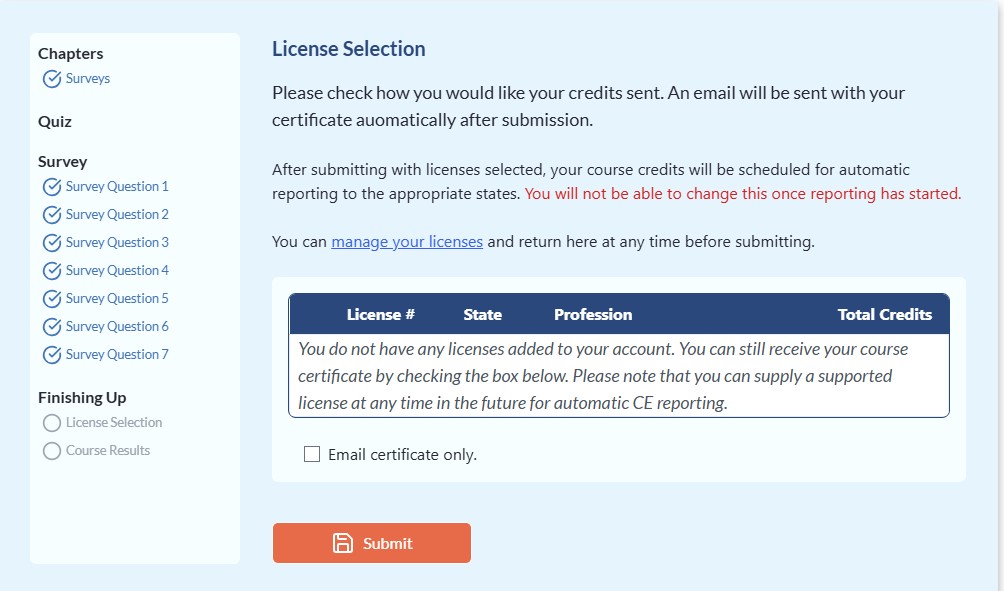
After finishing the course content, you must select the license you want the course reported to. This final step is required because many healthcare professionals hold multiple licenses and may not want their course reported to every state.
To complete this step:
- Go to My Courses.
- Find the course. If the final step hasn't been completed, the status will show "Selecting License."
- Click "View" to go back into the course.
- Select the license you want the course reported to. If you don't have a license entered, select "Manage Licenses" to add one.
Once you select your license, your course will be reported to CE Broker immediately (when applicable). Your certificate will also become available under My Courses, and a copy will be emailed to you.
If your course says "Selecting License," the course is not quite finished yet. Simply go back into the course and complete this final step.
 to open or download your certificate.